
Download LivePlan – Business Planning, Forecasting & Dashboard Tool
Overview
LivePlan is a cloud‑based business planning and performance‑tracking platform that guides entrepreneurs, small‑business owners, and growing enterprises through every stage of creating a solid business plan. From the first brainstorming session to a polished pitch deck, LivePlan walks you through a step‑by‑step process that eliminates guesswork and helps you articulate your vision with professional‑grade clarity. The software includes built‑in budgeting tools, financial forecasting models, and industry‑benchmark comparisons so you can see whether your assumptions hold water before you invest time and money.
Once your plan is live, the platform’s real‑time dashboards monitor key metrics—revenue, cash flow, profit margins—and compare them against both your internal targets and external industry baselines. This continuous feedback loop makes it easy to spot trends, adjust strategies, and keep stakeholders informed. Whether you’re launching a startup, seeking investors, or simply needing a roadmap for sustainable growth, LivePlan offers a secure, user‑friendly environment that streamlines the entire planning lifecycle.
Key Features
- Step‑by‑Step Plan Builder: Guided templates for executive summaries, market analysis, operational plans, and financial statements.
- Financial Forecasting Engine: Automatic generation of profit‑and‑loss, cash‑flow, and balance‑sheet projections with scenario planning.
- Industry Benchmark Database: Compare your numbers to thousands of real‑world companies across sectors.
- Live Dashboard & KPI Tracking: Real‑time visualizations of revenue, expenses, and growth metrics against custom goals.
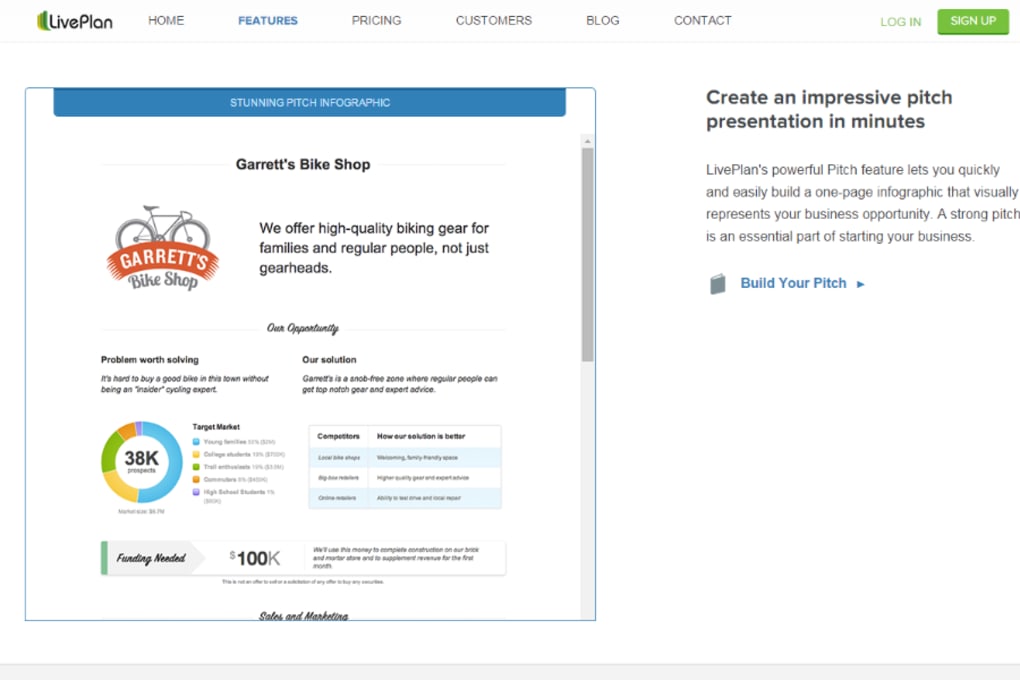
- Pitch Deck Creator: Turn your business plan into a compelling slide deck with drag‑and‑drop design tools.
- Collaboration & Sharing: Invite team members, advisors, or investors to view or edit specific sections securely.
- Export Options: Download plans as PDF, Word, or PowerPoint files for offline presentation.
- Secure Cloud Storage: All data is encrypted at rest and in transit, with automatic backups.
- Integration Capabilities: Sync with popular accounting software (QuickBooks, Xero) and CRM platforms.
- Regular Updates & Support: Monthly feature releases and 24/7 email chat support.
Installation & Usage Instructions
LivePlan is a web‑based SaaS solution, so there is no traditional installation process. To get started, follow these simple steps:
- Create an Account: Visit LivePlan.com and click “Start Free Trial.” Provide an email address, set a password, and verify your account through the confirmation link.
- Select a Pricing Plan: Choose between the “Standard” or “Premium” subscription. Both plans are billed annually or monthly, with a 14‑day money‑back guarantee.
- Set Up Your Business Profile: Enter basic company information—name, industry, location, and legal structure. This data seeds the benchmark database for accurate comparisons.
- Begin the Guided Builder: The platform presents a series of tabs (Vision, Market, Products, Financials). Fill in each section using the built‑in prompts, sample text, and drag‑and‑drop charts.
- Configure Financials: Input historical data (if available) or use the auto‑populate feature that pulls numbers from connected accounting apps. Adjust assumptions for growth rates, pricing, and cost of goods sold to see multiple forecast scenarios.
- Activate the Live Dashboard: Once the plan is saved, navigate to the “Dashboard” tab. Here you can set KPI targets, link bank accounts, and enable email alerts for metric deviations.
- Share & Collaborate: Invite co‑founders or advisors by entering their email addresses. Assign role‑based permissions (view, comment, edit) to keep the workflow secure.
- Export & Present: When you’re ready, click “Export” to download a polished PDF or generate a pitch deck for investor meetings.
Because LivePlan runs entirely in the browser, you can access your plan from any device with an internet connection. The platform is optimized for both desktop (Chrome, Firefox, Edge, Safari) and mobile browsers, ensuring a seamless experience on tablets and smartphones.
Compatibility, Pros & Cons
LivePlan is compatible with all major operating systems that support modern web browsers, including Windows 10/11, macOS 10.15+, Linux distributions, iOS 13+, and Android 8+. No additional software downloads are required, making it a truly cross‑platform solution.
Pros
- Intuitive, step‑by‑step workflow reduces the learning curve for first‑time entrepreneurs.
- Comprehensive financial modeling tools eliminate the need for separate spreadsheet software.
- Industry benchmark data provides realistic context for forecasts.
- Live KPI dashboard keeps business performance visible in real time.
- Secure cloud storage ensures data safety and easy access from anywhere.
- Collaboration features streamline feedback from partners and investors.
- Integration with accounting platforms reduces manual data entry.
Cons
- Subscription pricing may be high for solo freelancers on a tight budget.
- Limited offline capabilities; an internet connection is required to edit.
- Advanced forecasting options can be overwhelming for users without a finance background.
- Custom branding on exported documents is only available in the Premium plan.
- Some industry benchmarks are based on aggregated data and may not reflect niche markets.
Frequently Asked Questions
Is LivePlan suitable for non‑technical founders?
Absolutely. The guided plan builder uses plain‑language prompts and visual examples, so you don’t need advanced accounting or writing skills to create a professional business plan.
Can I import data from existing spreadsheets?
Yes. LivePlan supports CSV imports for revenue, expense, and balance‑sheet data, allowing you to migrate historical numbers quickly.
How secure is my financial information?
All data is encrypted both in transit (TLS 1.2) and at rest (AES‑256). LivePlan also offers two‑factor authentication and regular security audits.
Do I need a credit card to start the free trial?
No. LivePlan provides a 14‑day free trial with full feature access, and you can cancel anytime before the trial ends without providing payment details.
Can LivePlan integrate with my existing accounting software?
LivePlan integrates directly with QuickBooks Online, Xero, and Wave, allowing automatic synchronization of income and expense data for up‑to‑date financial forecasts.
Conclusion & Call to Action
LivePlan stands out as a comprehensive, cloud‑native solution that transforms the daunting task of business planning into a structured, data‑driven process. Its blend of guided templates, robust financial modeling, and live performance dashboards equips entrepreneurs with the tools they need to test assumptions, attract investors, and steer their companies toward sustainable growth. While the subscription cost may be a consideration for solo founders, the time saved, reduced risk, and professional output often justify the investment. If you’re ready to move from a vague idea to a fully articulated, financially sound business plan—complete with real‑time tracking—LivePlan is the platform to download today.
Start your free trial of LivePlan now and experience the confidence that comes with a live, data‑backed roadmap for success.



.png)



